Wednesday, September 12, 2012

Minds, Brains and Programs


Minds, Brains, and Programs
By: Dr. John R. Searle

This paper is arguing the long debate about Artificial Intelligence (AI) and whether or not man-made machines are fundamentally capable of intentionality.  Intentionality meaning the understanding of something past what it is, and more about what it embodies.  Dr. Searle’s example of the Chinese box explains that a machine that passes the Turing test does not imply that it has intentionality.  A machine that can take in Chinese characters and accurately give a response in Chinese does not imply that the machine understands Chinese like a Chinese speaking human does.  A person, that has no prior knowledge of Chinese, can also take in Chinese characters in the same way, and use the same algorithmic processes the machine uses to get the same answer without knowing what they mean.  Since the human does not understand Chinese, but can still deceive a Chinese speaking human into thinking they do, then the machine by comparison does not understand Chinese in the same way. 
The rest of the paper is Dr. Seale refuting responses to his argument about how man-made machines cannot achieve intentionality as a human mind can.  He explains that the human mind is intentional because our human brain is “causally capable of producing perception, action, understanding, learning, and other intentional phenomena. And part of the point of the present argument is that only something that had those causal powers could have that intentionality“.  We do not function as a computer does with algorithms which are only capable of running and create the information of the next algorithm. 
I believe that Dr. Seale makes very valid explanations as to why machines running off of formal processes can never be capable of intentionality.  They can only simulate understanding because the machine did not make the programs it uses and so has no real understanding of the contents of the programs and know way of ever knowing them.  Looking back at the Chinese box, consider why the human did not retain any intentionality about the Chinese language even though humans are fully capable of intentionality.  The algorithms did not teach them anything that would aid in understanding the Chinese language.  The million dollar question I think of when considering this is how exactly do humans obtain intentionality about something?  That is what is needed to know before any human can possibly make a man-made machine do likewise.  In Dr. Seale’s definition of understanding, how do humans come to the conclusion that they understand something? 

Tuesday, September 11, 2012

Book Reading #1: Chapter 1

The Design of Everyday Things

By: Donald A. Norman

Chapter 1
The way Dr. Norman explains the basic principles of making user friendly designs is so incredibly simple that it is a wonder why they have not been made standard long ago.  He goes on later to explain why that is, but when he was explaining the components of a good intuitive design I thought it was mind melting how obvious they were. I have come in contact with glass doors like the ones his friend got stuck in many times. I always got a sense of confusion when approaching them and had to really think about how to open them so as to not look silly.  At first, like Dr. Norman said the common response was, I felt embarrassed that I had to put so much thought into just opening a door. After encountering the doors enough times, I began to develop an immature idea along the lines of Dr. Norman's visual component of design as to why the doors were so terrible. If I can't see the hinges then there is no sure way of knowing which side is the right side to push or pull.  This is a reason I chose to take this course. I do not want to design a door that makes people feel stupid by requiring more thought than it should. Over processing a user is inefficient and bad for business. 

Monday, September 10, 2012

Paper Reading #6: Using Rhythmic Patterns as an Input Method

Using Rhythmic Patterns as an Input Method

Emilien Ghomi     Guillaume Faure     Stéphane Huot     Olivier Chapuis     Michel Beaudouin-Lafon
ghomi@lri.fr         gfaure@lri.fr            huot@lri.fr           chapuis@lri.fr       mbl@lri.fr

Univ Paris-Sud (LRI)                        CNRS (LRI)                        INRIA
F-91405 Orsay, France                    F-91405 Orsay, France       F-91405 Orsay, France

Author Bios:
Emilien Ghomi   
  • Ph.D Student at Université Paris-Sud
  • Michel Beaudouin-Lafon and  Stéphane Huot are his advisors
Guillaume Faure
  • Ph.D Student at Université Paris-Sud
  • Michel Beaudouin-Lafon is his supervisor
Stéphane Huot  
Olivier Chapuis
  • Research Scientist at LRI (Paris-Sud).
  • Ph.D. in Mathematics from University Paris VII Diderot
Michel Beaudouin-Lafon
  • Senior member of Institut Universitaire de France
  • Ph.D. thesis at Laboratoire de Recherche en Informatique, Univ. Paris-Sud
All are members of the InSitu research team (LRI & INRIA Saclay Ile-de-France).

Summary:
The authors of this paper are testing the use of short 2-6 beat rhythmic patterns as a replacement for interacting with computers, phones and other devices with the use of various motion or touch pad sensors.  The uses of rhythms as controls is endless, from turning a phone on vibrate or skipping a song just by tapping it in your pocket to replacing hot key shortcuts in computer programs.  They posed some questions that would test if implementing technology with rhythmic controls is worth developing: 
  • Are people able to learn and memorize patterns? 
  • Can they use them to trigger commands? 
  • Which patterns make sense for interaction and how to design a vocabulary? 
  • What is the best feedback helps executing and learning patterns? 
  • How to design effective recognizers that do not require training?
Related work not referenced in the paper:
  • Five-Key Text Input Using Rhythmic Mappings
    • Uses multiple taps to represent a single character on a keypad that is much smaller than a normal full sized keyboard.  It does not use a beat but only a sequence of button presses.  
  • Rhythmic Interaction with a Mobile Device
    • The authors wanted to be able to measure the movement of a phone in a 3D space to interpret rhythmic gestures to provide spatiotemporal gesture classification.  This does not use rhythmic tapping with a beat to command a device.
  • Music Wall: A Tangible User Interface Using Tapping as an Interactive Technique
    • uses a sequence of taps to interface with a wall or table using embedded sensors for casual communication like knocking on a door rings the doorbell.  This is a similar idea only used on different types of devices for different purposes.
  • RhythmLink: Securely Pairing I/O-Constrained Devices by Tapping
    • The title is self explanatory. It uses a shared sequence of taps to securely link devices such as bluetooth headset to a phone.  The authors do not intend to use rhythms for controlling devices as intended in the paper I am evaluating.
  • inTUIt – Simple Identification on Tangible User Interfaces
    • Uses tapping as a way of interacting, but does not go further into making different types of tapping different commands. 
  • Exploring Reinforcement Learning for Mobile Percussive Collaboration
    • Aims to makes real-time, multi-user musical expression on mobile devices just as intuitive as their physical counterparts.
  • Sonic gestures and rhythmic interaction between the human and the computer
    • Explains many different ways of interacting with a device such as tapping on a table, but does not actually implement an experiment or way of measuring the tapping sequences.
  • Movement Sonification: Effects on Perception and Action
    • Translates movement, such as a person jumping, into a sound wave using qualities such as the force the person exerts on the ground over time.
  • Gesture Authentication with Touch Input for Mobile Devices
    • Intends rhythmic patterns as passwords and not basic user commands for devices.
  • Temporal Interaction Between an Artificial Orchestra Conductor and Human Musicians
    • Is intended to guide an orchestra by listening to the tempo and rhythm of the music and moving accordingly as a human musician would do.
Evaluation:
two experiments were done. The first was to evaluate whether a computer can register the rhythmic patterns of a novice user effectively. The second was to see if patterns can be memorized as efficiently as the shortcuts used today. The first experiment used 30 patterns the participants listened to and saw a visual representation before attempting to replicate the pattern for the recognizer to interpret. There were four groups of participants. no feedback when tapping the rhythm, and audio feedback, a visual feedback and a combination of visual and audio feedback.  Figure 6 show the quantitative data gathered.  The qualitative data consisted of how the participants felt about the different forms of feedback. Many only wanted one form of feedback if they had both and the quantitative data clearly shows that no feedback did not work as well.  The second experiment used hot keys as an example of a long used shortcut system that their rhythmic patterns may be able to replace.  To see if using rhythms is just as fast as using hot keys, they assigned 14 patterns and hot keys to the same object with no correlation between the patterns and hot keys to the object. The audio only feedback was used since it was the most effective from experiment 1.
The participants had the choice of using either patterns or hot keys as long as they tried both. Most used the patterns because they found it more fun.  The experiment was stretched over two days to get a better accuracy with how the participants memorized the shortcuts.  There were two groups, one where participants were told the shortcuts and then did a memory test and the other group was given help whenever they needed it.  The quantitative data are shown in the figures to the right.  In Figure 14, there is not much of a difference in the recall rate once the patterns and hot keys are learned.  In Figure 15, the help rates are also rather similar between the rhythmic patterns and hot keys showing that learning patterns is just as easy to learn as the conventional hot keys are.

Discussion:
They listed many ways that makes rhythmic patterns better than using hot keys, but I do not believe they will be able to replace them.  I see this as a great way to give commands to phones without having to take them out of your pocket or to skip songs as you jog and other thing like that.  They need to run an experiment testing how long it takes to do some simple tasks using patterns and hot keys.  I think that someone using the patterns will never be able to move as quickly as an experienced hot key user since pauses are an inherent part of giving a command rhythmically. 


Thursday, September 6, 2012

Paper Reading #5: Ripple Effects of an Embedded Social Agent: A Field Study of a Social Robot in the Workplace


Ripple Effects of an Embedded Social Agent:
A Field Study of a Social Robot in the Workplace

Min Kyung Lee(1), Sara Kiesler(1), Jodi Forlizzi(1), Paul Rybski(2)

Human-Computer Interaction Institute1, Robotics Institute2
Carnegie Mellon University
5000 Forbes Ave, Pittsburgh, PA 15213 USA
{mklee, kiesler, forlizzi, rybski}@cs.cmu.edu

Author Bios:
Min Kyung Lee
  • Sara Kiesler is her Ph.D. adviser.
Sara Kiesler
  • Social and behavioral aspects of computers and computer-based communication technologies.
Jodi Forlizzi
  • Associate Professor, School of Design and Human-Computer Interaction Institute,
  • The A. Nico Habermannn Chair in the School of Computer Science
Paul Rybski
  • Systems Scientist – RI, ECE Carnegie Mellon
  • PhD, 2003 Computer Science and Engineering UMN
Summary:
A social robot called Snackbot delivered snacks to people in an office and engaged the recipients with small talk as it delivered their snacks.  The authors of the paper wanted to see how people interact with and perceive Snackbot. There has not been a study on if robotic agent's social skills begin to annoy people interacting with the agent for an extended amount of time.  Snackbot was 4.5 feet tall and had a face that went through many tests to be as pleasing to people as possible.  Snackbot was remotely controlled by an operator on a laptop and moved autonomously and had a speech recognition system. Unless an issue occurred, the operator never took control of the robot.  The most common times the operator had to step in was if a participant asked a question that Snackbot did not know how to answer.  Interactions started with Snackbot identifying the participant, engaging in small talk, giving them their snack and then leaving in a socially acceptable manner.  Snackbot was given categories and topics to engage the participant in based on the unique participant, what snack they chose, seasonal or apologies for breaking down since it happened often.   

Related work not referenced in the paper:
  • Involving Users in the Design of a Mobile Office Robot
    • The robot in this paper was made to assist in fetching objects for physically impaired people in the work place.  The authors were interested in how people in an office would perceive a robot over an extended period of time exactly like with Snackbot. It was not autonomous nor did it have speech recognition like Snackbot.
  • The USUS Evaluation Framework for Human-Robot Interaction 
    • The authors identify what a robot must be and be capable of doing in order for it to have a seamless integration into the work place. It pretty much lists out the same topics that Snackbot was meant to test, but they do not provide any field study data.
  • Studying the acceptance of a robotic agent by elderly users
    • The point of this paper is to do a filed study to see if a robot could be socially accepted among elderly people as it helps their day to day lives.  It may have a more focused audience of study than Snackbot, but the idea is exactly the same. Snackbot is not at all a novel idea.
  • Human–Robot Interaction in Rescue Robotics
    • This paper is about creating more environmentally aware rescue robots that do not take many people to control and to also be socially accepted as a robotic agent.  
  • Whose Job Is It Anyway? A Study of Human–Robot Interaction in a Collaborative Task
    • This paper explains how the time for collaboration with humanoid like robots in the work place is not far in the future. It describes exactly what all these other papers are doing, such as Snackbot, which is slowly perfecting the art of creating a robot so life like that it can easily be socially accepted by humans.
  • Final Report for the DARPA/NSF Interdisciplinary Study on Human–Robot Interaction
    • This paper explains how roboticists collaborated with psychologists, sociologists, cognitive scientists, communication experts and HCI specialist to setup a common ground for them all to work together in making a more humanoid robot agent to interact on a daily basis with people in many different environments. 
  • A Methodological Variation for Acceptance Evaluation of HumanRobot Interaction in Public Places  
    • This paper has the exact same idea that the experiment involving Snackbot was in tended to do only for public uses.  It does not have any field data though.
  • A Social Informatics Approach to Human–Robot Interaction With a Service Social Robot
    • The authors describe experiments that have been done involving the benefits of emotional and social robots against emotionless robots in work environments like an autonomous cherry picker. They describe how they believe robots should approach social intelligence in order to be successful in society.
  •  Teamwork-Centered Autonomy for Extended Human-Agent Interaction in Space Applications
    • Astronaut's jobs working in space is incredibly dangerous and would greatly improve if they could work with autonomous robots that can intelligently do jobs that are too dangerous or slow for humans to do in space.
  • Enjoyment, Intention to Use And Actual Use of a Conversational Robot by Elderly People
    • Not all social agents have to be used strictly as workers.  They will also be used as potential company for people like the elderly who can't be left alone too long, but can't afford a full time nurse either.  This robotic agents helping, a single nurse can take care of many elderly people at once.
Evaluation:
Snackbot delivered snacks to 16 offices on one floor of a building at a US university.  There were 21 participants, 8 women and 13 men ranging from 22-51. There were 11 graduate students, eight staff, one doctor and one faculty member. They were all part of the computer science department, but half had no programming experience.  Snackbot delivered snacks between 2:30-4 p.m. on Mondays, Wednesdays and Fridays for four months.  All data was subjective since the experiment was to see if the participants would accept Snackbot socially. 175 interactions were recorded and 161 interactions were videoed. Participants interacted with Snackbot an average of 9 times over their two months of deliveries. Participants were not told that they would be given snacks by a robot when they signed up. There was mostly qualitative data since the impressions Snackbot had on the participants were mostly collected in end experiment interviews. Five participants saw Snackbot as a failed person because it broke down every once on a while and sometimes interacted inhumanly such as asking a door if it could pass or pausing for extended periods during a conversation.  These breakdowns helped the participants keep the sense that Snackbot is in fact a robot.  From the interviews it was found that most of the participants got used to Snackbot and would sometimes go out of their way to make sure they were in their office when it arrived.  They would call days Snackbot would come around "Snackbot day".  When participants were busy and did not want to talk to Snackbot, they said they later felt bad about getting irritated with Snackbot. The majority of the participants felt emotions for Snackbot whenever it "humiliated" itself when it would breakdown.  Some participants got jealous of other participants because they appeared to get more attention from Snackbot when in actuality they were not.  An unintended effect of Snackbot called the ripple effect where people that were not participating, but watched Snackbot's interactions built both negative and positive behaviors about Snackbot.  Over time the ripple effect grew and was variables like office culture were a factor and needed to be considered when deploying a social agent like Snackbot in a work environment.  Over all 75% of participants grew to enjoy interacting with Snackbot.

Discussion:
I believe that as robotics and the technology to build them increases we will begin to see more and more robotic agents in work places everywhere. This experiment was not novel and has been done before, but not at this level of computing power.  It was building off of so many other experiments that all were better than the last.  The participants were not a representation of a normal work environment considering it was a computer science department in a university and they could easily have known the authors of this paper.  Their opinions on the matter were probably far from being unbiased.  Bias is impossible to get rid of in an experiment like this, but more diverse participants are a must.

Paper Reading #4: Pay Attention! Designing Adaptive Agents that Monitor and Improve User Engagement


Pay Attention! Designing Adaptive Agents that Monitor and Improve User Engagement

Dan Szafir, Bilge Mutlu
Department of Computer Sciences, University of Wisconsin–Madison
1210 West Dayton Street, Madison, WI 53706, USA
fdszafir,bilgeg@cs.wisc.edu

Author Bios:
Dan Szafir
Bilge Mutlu
  • In the Department of Computer Sciences at the University of Wisconsin-Madison.
Summary:
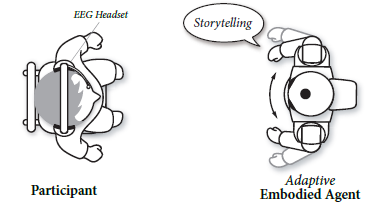
A robotic agent that tells a story and monitors the users behaviors, emotions and  mental states to best keep the user's attention on the story.  Recently, studies have been using electroencephalography(EEG) signals to measure alertness and attention. This new technology is commercially available making brain-computer interface(BCI) possible. The robotic agent uses this new advancement in the form of large headphones to monitor the FP1 region of the cortex which is thought to control learning, mental states and concentration.  When the attention of the user on the story begins to decrease, the robotic agent changes its tone, engages gestures and other techniques known to regain a user's attention.  These techniques have been thoroughly studied and many long standing educational theories have been made.

Related work not referenced in the paper:
  • On the Use of Electrooculogram for Efficient Human Computer Interfaces
    • Explains how the use of different BCI types can be used to help people physically disabled to interact with computers. It mainly described the use of electrooculogram(EOG) which follows eye movement, but explains how EEG would be a more reliable way of BCI interaction.
  • A hybrid platform based on EOG and EEG signals to restore communication for patients afflicted with progressive motor neuron diseases
    • The title is so long it pretty much speaks for itself. It focuses on the use of the BCI tools to help people impaired physically interact with specific devices. It does not consider their use to monitor a user's attention like the robotic agent.
  • Brain–Computer Interfaces for Multimodal Interaction: A Survey and Principles
    • This paper is very similar to Pay Attention! and talks about how EEG measurements can be used to help people suffering from attention deficit hyperactivity disorder or non-disabled people stay focused on a single task or a story in our case.  It does not actually implement this idea though and stays in the realm of potential uses for this new technology. No real experiments were done like in the paper I am writing about.
  • Brainput: Enhancing Interactive Systems with StreamingfNIRS Brain Input
    • This paper sees the use of BCI devices as a new way of interacting with computers and other devices to maximize a person's productivity by preventing them  from being mentally overwhelmed with tasks and not as a learning aid. 
  • Adaptive Brain Interfaces
    • Like many of the papers involving BCI devices, this paper also is about how it can be used for physically disabled persons interact as they could never have before.
  • Towards passive brain–computer interfaces: applying brain–computer interface technology to human–machine systems in general
    • Again, another title so long it describes its content too well. It explains the development of BCI and where the authors think it will be in the future. It gives a few examples of BCI devices, not any using it as a way of keeping a user's attention like the robotic agent.
  • Electroencephalogram-Based Control of an Electric Wheelchair
    • In the beginning of BCI research the focus was on aiding the disabled and this paper is one of them only it has focused on the use to control a wheel chair instead of a computer like the other papers I have been finding.  Like the other papers, it does not consider BCI devices as a way of keeping a user's attention either.
  • Combining Eye Gaze Input With a Brain–Computer Interface for Touchless Human–Computer Interaction
    • This paper again is focused on the idea of being able to control a computer pointer with nothing but your gaze and thoughts. There are many papers on BCI with this same idea, but none of them that I have found consider its use for teaching by keeping the user's attention.
  • Using a Low-Cost Electroencephalograph for Task Classification in HCI Research
    • They had three different tasks that the user would perform and the EEG device would differentiate which task they were performing from stimulation in the brain. It can measure a user's mind state, but does not measure  their attention or concentration.
  •  Towards Ambulatory Brain-Computer Interfaces: A Pilot Study with P300 Signals
    • When a user is in motion, the EEG signal is reduced significantly. This paper proposes a solution to this problem by measuring a specific brain signal called P300.  The author's idea of a potential use for this is mainly entertainment purposes and not learning which is the focus of the robotic agent in the paper I am reading. 
Evaluation:
There were two hypotheses the author's wanted to evaluate. The first was that the educational attention grabbers performed by the robotic agent when EEG measurements of the user's attention drops will raise their attention and improve their learning performance. The second states that the robotic agent's engagements with the user when their attention decreases will also help motivate them and increase their rapport with the agent. To test these hypotheses, participants are placed in a room with a robotic agent that beings with a lesson on the zodiac signs followed by a long story.  Then objective questions about the zodiac signs were asked and then questions about the story were asked. During the lesson on zodiac symbols no attention grabbing cues were used, so it was as if they were simply listening to an audio tape. This part was meant to be a buffer to draw the participant's attention from the real test of the long story.  There were three groups that each listened to the story in three distinct ways. the first was with no attention cues, the second was with randomly timed cues and the third was with the adaptive cues when the user was loosing focus.

The results from the questions backed their first hypothesis.  Subjective observations of the participants after their interaction with the robotic agent showed interesting results.  Females showed a higher sense of motivation and rapport with the agent confirming the second hypothesis, but the male participants had the exact opposite reactions not how the authors expected. The authors considered this as a possible result of the appearance of the robot being small and having a child's voice which could be easier for women to connect with than men.

Discussion:
The objective data gathered showed that the adaptive robotic agent improved the learning curve of the participants by a significant margin. The idea of using EEG measurements to track attention and concentration is not a completely novel idea, but I could not find any other paper where the authors use a human like robot to act as a teacher.  This was the only paper I found that had actual observed data of a BCI device positively impacting a user's ability to retain new subjects they have just learned.

Tuesday, September 4, 2012

Paper Reading #3: HoloDesk: Direct 3D Interactions with a Situated SeeThrough Display


HoloDesk: Direct 3D Interactions with a Situated SeeThrough Display

Otmar Hilliges (1), David Kim (1,2), Shahram Izadi (1), MalteWeiss (1,3), Andrew D.Wilson (4)

1 Microsoft Research   2 Culture Lab               3 RWTH Aachen University   4 Microsoft Research
 7 JJ Thomson Ave         Newcastle University,   52056 Aachen,                       One Microsoft Way
 Cambridge, UK             Newcastle, UK             Germany                                Redmond, WA
{otmarh,b-davidk,shahrami,awilson}@microsoft.com, weiss@cs.rwth-aachen.de

Author Bios:
Otmar Hilliges
  • PhD in Compter Science from Ludwig-Maximilians Universität München / LMU Munich
David Kim
  • Part of Microsfot Research in Cambridge, UK
Shahram Izadi
  • Research scientist at Microsoft Research Cambridge. 
  • Xerox PARC before that.
  • PhD with Tom Rodden and Yvonne Rogers working on the EQUATOR project.
Malte Weiss
  • PhD student at the Media Computing Group of RWTH Aachen University.
Andrew D.Wilson


Summary:
A user can interact with 3D virtual objects that act like physical objects through pushing, scooping up and even grasping the virtual objects within the scene of the HoloDesk. The creators made manipulating the virtual objects as intuitive as possible by being able to grasp objects and turning and rotating them. As shown in the pictures below, physical objects can also be used to interact with the virtual objects.  Of course it is limited by the fact that the virtual objects cannot interact back with the physical objects, they can only react as a physical object would. Physical objects even cast virtual shadows on virtual objects that are bellow them.
It consists of an interaction volume where the virtual objects appear to be when looking through the glass transparent glass beamsplitter right above the volume.  A RGB Webcam measures the orientation and position of the user's head so that the projected 3D volume from the LCD is displayed so that when the user looks through the beamsplitter it is a if the projection is under it. A Kinect is used to track the user's hands and other physical objects that may interact with the virtual objects in the volume. The RGB Webcam is continuously updating where the user's head is and refreshing the projection to keep up the illusion of the virtual 3D volume.

Related work not referenced in the paper:
  • Calibration Requirements and Procedures for a Monitor-Based Augmented Reality System
    • Talks about the mathematics needed in order to successfully display an augmented reality such as the GPS coordinates and orientations of users and virtual objects. It does not use a webcam to judge orientation or a beamsplitter to give the illusion of a 3D space like the HoloDesk does.
    •   
  •  Face to Face Collaborative AR on Mobile Phones
    • From the massive amount of augmented reality already being used in phones, they went a step further and added a face to face aspect. When connected to another person's phone they can see each other as if the other player was on the other side of a table tennis game. This was limited to a 2D representation since it was only using a camera phone where as the HoloDesk is fully a 3D experience.
  • Table Top Augmented Reality System for Conceptual Design and Prototyping
    • This is very similar to the concept of the HoloDesk, but was implemented in a very different way. A large LCD screen is lifted a couple inches off a table and a person reaches under it where a camera displays your hands on the LCD screen along with the 3D environment to manipulate. you cannot directly see your hands and so is not as natural looking as the HoloDesk is. The virtual objects also do not act as they would if they were real as they attempt to do in HoloDesk.
  • The Office of the Future: A Unified Approach to Image-Based Modeling and Spatially Immersive Displays
    • The office of the future uses magnetism to track a users head orientation to project a seemingly 3D image on any surface instead of a camera and does not allow direct manipulation of virtual objects like HoloDesk does.
  • Combining Multiple Depth Cameras and Projectors for Interactions On, Above, and Between Surfaces
    • LightSpace is a small room with projectors and a depth camera suspended on the ceiling. The depth camera follows a person's movements and registers gestures to interact with the walls and table. It does not display an interactive 3D environment, but it does project 2D images into the user's hand or the floor.
  • MirageTable: Freehand Interaction on a Projected Augmented Reality Tabletop 
    • The MirageTable is very similar to the HoloDesk in that a camera follows the user's head and virtual objects can be manipulated with just your hands. However, objects cannot be grasped and there is a projector instead of an LCD screen and beamsplitter.
  • Vision-based 3D Finger Interactions for Mixed Reality Games with Physics Simulation
    • Uses a laptop and 3D camera to interact with virtual objects that are displayed on the laptop's screen. The only way to interact with the objects is by selecting them with your fingertip at which point a virtual tether links the object to your finger. There is no 3D volume and the interactions are not as intuitive as the HoloDesk.
  • Interactions in the Air: Adding Further Depth to Interactive Tabletops
    • Uses a projector under the table to display virtual objects that can be grabbed by pinching your fingers above the table.  Virtual objects cannot be picked up and the display is 2D so it does not require head tracking.
  • Multimodal Interaction in an Augmented Reality Scenario
    • A headset and glasses creates an augmented reality where a depth camera identifies objects and can follow the user's fingers in order to select menu items and physical objects by projecting a line along a pointing finger. There are no virtual objects to manipulate and is a mobile device unlike the HoloDesk.
  • Simulating Educational Physical Experiments in Augmented Reality
    • A head mounted unit creates an augmented reality through glasses where a pen with white balls attached for a depth camera to follow can create virtual objects and give them properties by drawing on a pad that is also being tracked with white balls attached to it. All virtual interaction is from the pen and pad where as the HoloDesk does not use any tools for interaction.
Evaluation:
There was an informal and a formal evaluation done. The informal evaluation simply had hundreds of users play with it without any prior instruction or objective to do.  All observations were qualitative and subjective based on the observer. The formal evaluation used a simple task to measure accuracy of where the virtual objects appear to be with three display types. standard setup(DHD), standard setup with stereo output(SHD) and Nvidia 3D Vision LCD shutter glasses(IHD).  The task started with a red cube that when touched would randomly spawn another cube and time how long it took the user to touch the new cube. when the second cube was touched, another appeared waiting to be touched. The results are displayed below.

Discussion:
I found the idea of the HoloTable to not be very novel, but how they went about creating it absolutely was.  There were many other augmented reality tables, but none had such intuitive interaction with the virtual objects as the HoloDesk.  I do not think the evaluation fully tested every aspect of the device, but they got very good reviews from the people how participated in the informal evaluation.  I think that it is a step up from all the other augmented reality tables out there.


Monday, September 3, 2012

Paper Reading #2: Touché: Enhancing Touch Interaction on Humans, Screens, Liquids, and Everyday Objects


Touché: Enhancing Touch Interaction on Humans, Screens, Liquids, and Everyday Objects

Munehiko Sato (1,2), Ivan Poupyrev (1), Chris Harrison (1,3)

1 Disney Research Pittsburgh,     2  Graduate School of Engineering,  3 HCI Institute,
   4720 Forbes Avenue,                   The University of Tokyo,                Carnegie Mellon University,
   Pittsburgh, PA 15213 USA           Hongo 7-3-1, Tokyo                     5000 Forbes Avenue,
   {munehiko.sato, ivan.poupyrev}    113-8656 Japan                            Pittsburgh, PA 15213 USA
   @disneyresearch.com                                                                  chris.harrison@cs.cmu.edu

Author Bios:
Munehiko Sato
Ivan Poupyrev
  • Senior research scientist at Walt Disney Research.
  • Worked as a researcher at Sony Computer Science Laboratories and the Advanced Telecommunication Research Institute International.
  • Ph.D. dissertation in Hiroshima University, Japan.
Chris Harrison
Summary:
Their Touché circuit device uses their new found Swept Frequency Capacitive Sensing technique to register multiple types of touches from the human body.  The device can be attached into any conductive object or material. Conductive diodes can be retrofitted to any non-conductive object touch sensitivity would be found useful to have. The human body can manipulate small electrical signals and Touché can monitor these changes.  The main novel idea is to measure the electrical alterations from human contact at different frequencies in a "sweeping" fashion.  This is a new concept because it was not feasible without the small and powerful processors that are now available. By taking data points at different frequencies, the sensitivity of the touch sensor is greatly improved.  In the figure to the right, picture a displays wrist bands that sense hand gestures in order to control a phone. Picture b shows a door knob sensitive to different types of touches. Picture c shows water that can sense how much of a person's body is in contact with he water. Picture d has a smart phone with a casing that is capable of registering exactly how a person is holding the phone and can respond accordingly.  These are only a few of the possible uses for Touché.  It is a very simple to install into a device. Only a single wire is needed to be in contact with the conductive surface for it to work properly and it is relatively cheap to create.

Related work not referenced in the paper:
  • ReachMedia: On-the-move interaction with everyday objects 
    • This is a wrist only device that uses radio waves to detect objects the person is holding. The object requires a RFID tag for the wrist device to detect it and give the user helpful information about it as they pick it up.  Touché is not used for this purpose and uses electrical human touch sensors not radio waves.
  •  Enabling mobile micro-interactions with physiological computing
    • Has an arm band that registers muscle movements in the hand to control a computer or other device. Also uses "Skinput" which is a touch UI from a projection onto the skin. No electrical signals are sensed like with the Touché.
  • Multimodal Human Computer Interaction: A Survey
    • States possible touch sensitive or gesture sensing ways of collecting commands by objects like computers. Does not say much about how to actually collect the data like Touché.
  • Evaluating Capacitive Touch Input on Clothes
    • Uses micro buttons sewn into fabrics in a visually appealing way with wires that can be stretched as to keep the fabric flexible.  The creators of Touché want to get away from actual buttons and create objects in themselves responsive.
  • gRmobile: A Framework for Touch and Accelerometer Gesture Recognition for Mobile Games
    • Uses an accelerometer and camera to visually register gestures and orientation. This is a completely different way of collecting gestures and their way is not very novel.
  • Your Noise is My Command: Sensing Gestures Using the Body as an Antenna
    • I found this one very interesting because it uses the EM fields already generated by wires in a home to be able to map where and what a person is touching such as a wall. This is similar but no the same as Touché since it uses EM instead of electrical inductance in the human body.
  •  Sensing Foot Gestures from the Pocket 
    • Attempts to provide silent commands to a phone in your pocket by sensing the orientation of the phone and flexing of the toes.  It uses buttons inside of a shoe to double tap or scrolling motion. I see many problems with this design. If you are running there is no telling what the sensors are going to accidentally register.
  • PACER: Fine-grained Interactive Paper via Camera-touch Hybrid Gestures on a Cell Phone
    • Uses a camera phone to visually map a physical piece of paper and a virtual one on the phone. You can then do things like search a term simply by selecting it on the virtual picture in the phone. This a completely different way of interacting with objects from Touché.
  •  On Body Capacitive Sensing for a Simple Touchless User Interface
    • Treats the human body one plate of a capacitor and senses guestures without actually touching anything. The motivation came from doctors not wanting to touch anything in fear of contamination. Where this uses capacitance Touché uses inductance of the entire body.
  • PocketTouch: Through-Fabric Capacitive Touch Input
    • Uses capacitance just like a touch screen on a phone, but it is capable of being put into many different types of fabric of eyes free use of your phone while it is in your pocket. This uses capacitance with the human body instead of inductance of an electrical signal like Touché.
Evaluation:
They evaluated the accuracy of Touché to correctly register different types of gestures with five different objects and materials: a doorknob, a table, a phone case, on-body sensing from wrist bands, and water.  They used two groups of 12 participants each. The groups were shown pictures of the possible gestures they could make with each object. They then were told to make these gestures one at a time. What Touché actually registered each of their attempted gestures as was kept from the participant and experimenters until the end. In the first group, experimenters used data gathered from each participant at the beginning of their testing in order to fine tune the Touché devices to the specific touch of each participants. The second gorup was "walk-up" where there was no prior data collection to their testing. The graphs below show their findings. all of their data collection was quantitative and objective.  More data was collected for the "walk-up" group because it was done on a later date.


Discussion:
I found this paper to be very interesting and can I can easily see this technology in our immediate future. the Touché device can potentially be attached to any object. It is so small and simple in its design that it can be added to everyday items cheaply without anyone even being aware it is there. Know one will notice a normal looking, key less door that will only open when you use the correct combination of hand gestures.